
Home › Services › Software Tools
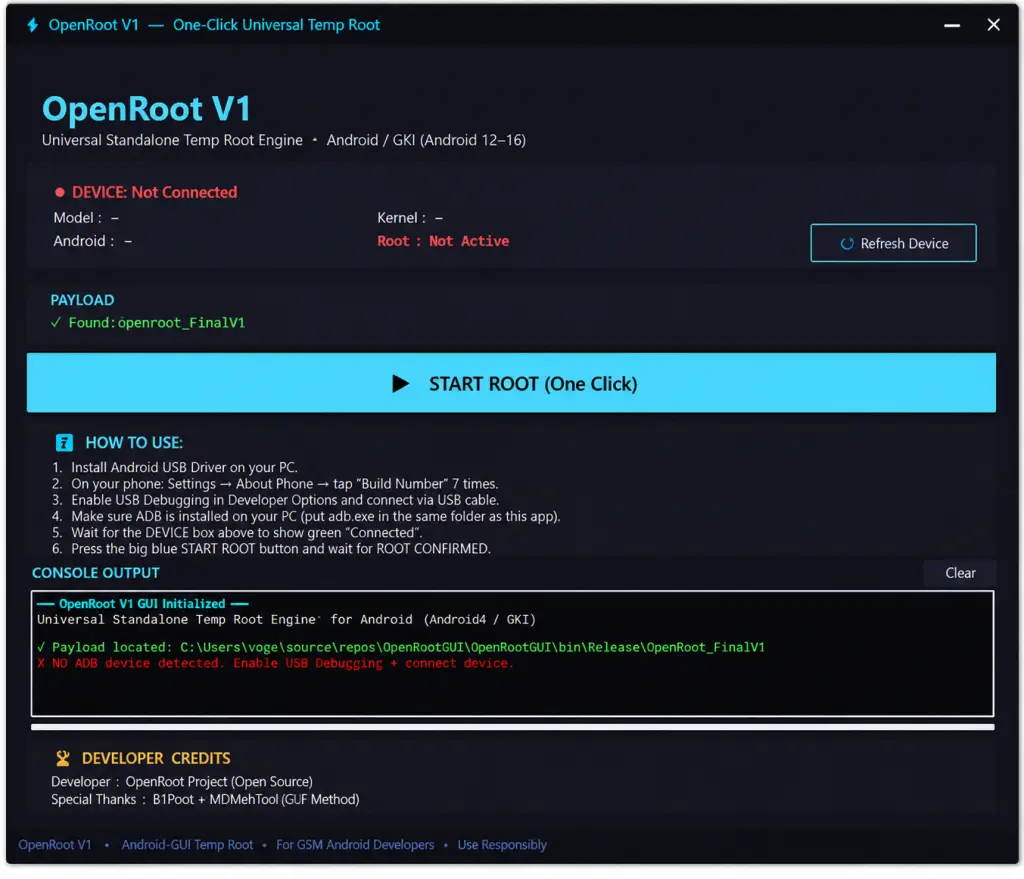
OpenRoot Tool V1 – Latest Version Available! For Windows
🔥 Looking for a simple and automated Android temporary root solution? Meet **OpenRoot V1**, a free and open-source Windows tool designed to make the rooting process easier with a one-click operation.
✨ **Key Features:**
✅ One-Click Root – Start the complete rooting process with a single button.
📱 **Automatic Device Detection** – Displays your phone model, Android version, and kernel version.
📂 **Auto Payload Detection** – Automatically finds the required payload file in the tool folder.
⚙️ **Built-in KernelSU Modules** – Includes modules for multiple supported kernel targets.
🔧 **Runtime Vermagic Adaptation** – Automatically adjusts module headers to match your device's kernel string.
📲 **Android Support** – Compatible with Android 12, 13, 14, 15, and 16.
🛠️ **GKI Kernel Support:**
- 5.10.x
- 5.15.x
- 6.1.x
- 6.6.x
- 6.12.x
- 6.18.x
🖥️ **Clean Dark UI** – Modern interface with custom title bar, minimize, and close buttons.
📊 **Live Console Output** – Color-coded progress messages for every operation.
📝 **Detailed Logs** – Saves operation logs to `/data/local/tmp/openroot.log`.
🟢 **Real Root Verification** – Reports SUCCESS or FAIL based on actual checks.
📖 **Built-in Help Guide** – Includes six simple steps to help beginners.
👨💻 **Credits:** Dfroot & MDMFixTool
💯 **100% Free & Open Source!**
---
### 📥 How to Install & Use OpenRoot V1
1️⃣ Download the OpenRoot V1 ZIP package.
2️⃣ Extract the ZIP file into a folder on your PC.
3️⃣ Place the `OpenRoot_FinalV1` payload file in the same folder as the tool.
4️⃣ Make sure `adb.exe` and its required DLL files are available in the same folder, or install Android Platform Tools.
5️⃣ Enable Developer Options on your Android phone by tapping Build Number seven times.
6️⃣ Enable USB Debugging and connect your phone to the PC using a USB cable.
7️⃣ Run OpenRoot V1 as Administrator.
8️⃣ Wait until your device is detected and the connection status turns green.
9️⃣ Confirm that the payload file is successfully detected.
🔟 Click the **START ROOT** button and wait for the process to finish.
🟢 Look for the **ROOT CONFIRMED** message in the console.
🔍 For manual verification, open a new ADB shell and enter:
`id`
If the output shows `uid=0`, root access has been confirmed.
⚠️ **Important Note:** OpenRoot V1 provides temporary root access. Root access will be lost after the next device reboot.
---
🔥 **OpenRoot V1 – Simple, Automated & Free Android Rooting Tool!**
#OpenRoot #OpenRootV1 #AndroidRoot #KernelSU #TemporaryRoot #Android16 #AndroidTools #ADB #GKI #MobileRepair #FreeSoftware #OpenSource
| Service | OpenRoot Tool V1 |
|---|---|
| Category | Software Tools |
| Delivery time | At the Time. |
| Location | Global, Global |
| Posted | 35 minutes ago |
| Status | Available |

This service is free — tap Download to get the file.
Comments (0)
Create an account or Login to comment
You need an account to view images, open links, comment or like. Create an account or log in — it only takes a moment.