



Cell Repair

Cell Repair

Verified Member

1 followers • 1 following • 3 friends

GSM Technician

Personal details

  • GSM Technician
  • 0 yrs exp

Friends

3 friends

Cell Repair photoCell Repair photoCell Repair photoCell Repair photoCell Repair photoCell Repair photoCell Repair photoCell Repair photoCell Repair photo

Groups

2 groups joined

0 comments • 0 shares • 34 views • 2 min read

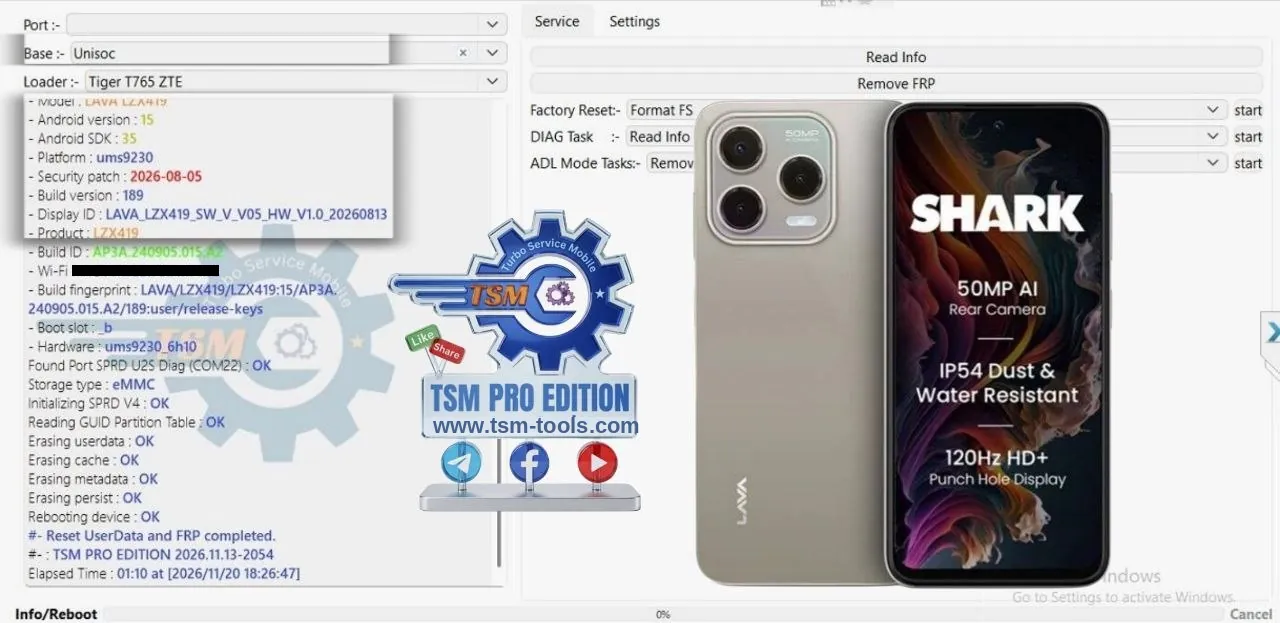
Remove FRP Lava Shark 4G LZX419 Unisoc

Remove FRP Lava Shark 4G LZX419 Unisoc | TSM Pro Edition

  • Remove FRP | LAVA SHARK 4G
  • Model: LZX419 | Android: 15 [SDK:35]
  • Patch: 2026-08-05
  • CPU: UNISOC Tiger T765 [ums9230] | Mode: ADL
  • Build: 189 | Product: LZX419
  • By: TSM PRO EDITION

FRP + UserData reset completed in 1 minute 10 seconds — ADL mode, tested on 20 Nov 2026. Full work log is in the screenshot, all steps OK.

Log
TSM PRO EDITION 2026.11.13-2054
Base :- Unisoc
Loader :- Tiger T765 ZTE
[top lines hidden behind the open Base dropdown]
- Model : LAVA LZX419
- Android version : 15
- Android SDK : 35
- Platform : ums9230
- Security patch : 2026-08-05
- Build version : 189
- Display ID : LAVA_LZX419_SW_V_V05_HW_V1.0_20260813
- Product : LZX419
- Build ID : ap3a.240905.015.a2
- Wi-Fi MAC : [hidden]
- Build fingerprint : LAVA/LZX419/LZX419:15/AP3A.
240905.015.a2/189:user/re…
- Boot slot : b
- Hardware : ums9230_6h10
Found Port SPRD U2S Diag (COM22) : OK
Storage type : eMMC
Initializing SPRD V4 : OK
Reading GUID Partition Table : OK
Erasing userdata : OK
Erasing cache : OK
Erasing metadata : OK
Erasing persist : OK
Rebooting device : OK
#- Reset UserData and FRP completed.
#- : TSM PRO EDITION 2026.11.13-2054
Elapsed Time : 01:10 at [2026/11/20 18:26:47]

Step-by-step guide

  1. In the tool, select the Base: Unisoc and the Loader: Tiger T765 ZTE.
  2. Connect the phone in ADL mode — "Found Port SPRD U2S Diag (COM22) : OK", Storage type eMMC, then "Initializing SPRD V4 : OK".
  3. The tool reads the GUID Partition Table and the device info: Model LAVA LZX419, Android version 15 [SDK:35], Platform ums9230, Security patch 2026-08-05, Build version 189, Display ID LAVA_LZX419_SW_V_V05_HW_V1.0_20260813, Product LZX419, Build ID ap3a.240905.015.a2, Hardware ums9230_6h10.
  4. Click Remove FRP — the tool erases userdata, cache, metadata and persist; each "OK".
  5. Rebooting device : OK" — "Reset UserData and FRP completed.
  6. Done in 1 minute 10 seconds — FRP lock removed with a full UserData reset, phone reboots.

Telegram Channel

WhatsApp Channel

#RemoveFRP #LavaShark4G #LZX419 #TSMToolPRO #FRPBypass #Unisoc #TigerT765 #ADLMode #Lava

Create an account or Login to comment

You need an account to view images, open links, comment or like. Create an account or log in — it only takes a moment.

0 comments • 0 shares • 45 views • 1 min read
Originally posted in TSM TOOL PRO Official • View original post
Cell Repair
10 hours ago • in TSM TOOL PRO Official

Remove FRP LAVA BOLD N2

  • Model: LZG412 | Android: 15 [SDK:35]
  • Patch: 2026-08-05
  • CPU: UNISOC SC9863A [sp9863a] | Mode: ADL
  • Build: 1787365021 | Product: LZG412
  • By: TSM PRO EDITION

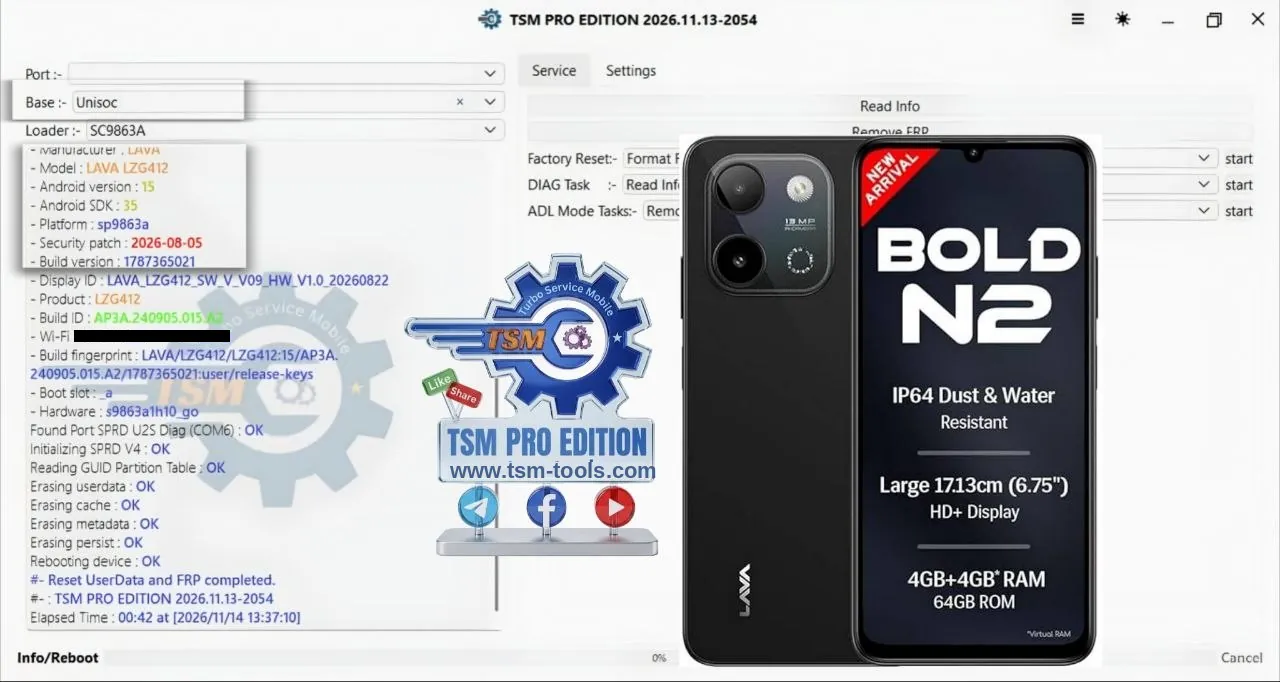
FRP + UserData reset completed in 42 seconds — ADL mode, tested on 14 Nov 2026. Full work log is in the screenshot, all steps OK.

Setup By Setup Guide

  1. In the tool, select the Base: Unisoc and the Loader: SC9863A.
  2. Connect the phone in ADL mode — "Found Port SPRD U2S Diag (COM6) : OK", then "Initializing SPRD V4 : OK".
  3. The tool reads the GUID Partition Table and the device info: Manufacturer LAVA, Model LAVA LZG412, Android version 15 [SDK:35], Platform sp9863a, Security patch 2026-08-05, Build version 1787365021, Display ID LAVA_LZG412_SW_V_V09_HW_V1.0_20260822, Product LZG412, Build ID ap3a.240905.015.a2, Hardware s9863a1h10_go.
  4. Click Remove FRP — the tool erases userdata, cache, metadata and persist, each "OK".
  5. Rebooting device : OK" — "Reset UserData and FRP completed.
  6. Done in 42 seconds — FRP lock removed with a full UserData reset, phone reboots.

Telegram Channel

WhatsApp Channel

#RemoveFRP #LavaBoldN2 #LZG412 #TSMToolPRO #FRPBypass #Unisoc #ADLMode #Lava

Log
TSM PRO EDITION 2026.11.13-2054
Base :- Unisoc
Loader :- SC9863A
[top lines hidden behind the open Base dropdown]
- Manufacturer : LAVA
- Model : LAVA LZG412
- Android version : 15
- Android SDK : 35
- Platform : sp9863a
- Security patch : 2026-08-05
- Build version : 1787365021
- Display ID : LAVA_LZG412_SW_V_V09_HW_V1.0_20260822
- Product : LZG412
- Build ID : ap3a.240905.015.a2
- Wi-Fi MAC : [hidden]
- Build fingerprint : LAVA/LZG412/LZG412:15/AP3A.
240905.015.a2/1787365021:…
- Boot slot : a
- Hardware : s9863a1h10_go
Found Port SPRD U2S Diag (COM6) : OK
Initializing SPRD V4 : OK
Reading GUID Partition Table : OK
Erasing userdata : OK
Erasing cache : OK
Erasing metadata : OK
Erasing persist : OK
Rebooting device : OK
#- Reset UserData and FRP completed.
#- : TSM PRO EDITION 2026.11.13-2054
Elapsed Time : 00:42 at [2026/11/14 13:37:10]

Create an account or Login to comment

You need an account to view images, open links, comment or like. Create an account or log in — it only takes a moment.

0 comments • 1 shares • 50 views • 2 min read

Remove FRP Lava Bold N2 LZG412 Unisoc | TSM Pro Edition

Remove FRP LAVA BOLD N2

  • Model: LZG412 | Android: 15 [SDK:35]
  • Patch: 2026-08-05
  • CPU: UNISOC SC9863A [sp9863a] | Mode: ADL
  • Build: 1787365021 | Product: LZG412
  • By: TSM PRO EDITION

FRP + UserData reset completed in 42 seconds — ADL mode, tested on 14 Nov 2026. Full work log is in the screenshot, all steps OK.

Setup By Setup Guide

  1. In the tool, select the Base: Unisoc and the Loader: SC9863A.
  2. Connect the phone in ADL mode — "Found Port SPRD U2S Diag (COM6) : OK", then "Initializing SPRD V4 : OK".
  3. The tool reads the GUID Partition Table and the device info: Manufacturer LAVA, Model LAVA LZG412, Android version 15 [SDK:35], Platform sp9863a, Security patch 2026-08-05, Build version 1787365021, Display ID LAVA_LZG412_SW_V_V09_HW_V1.0_20260822, Product LZG412, Build ID ap3a.240905.015.a2, Hardware s9863a1h10_go.
  4. Click Remove FRP — the tool erases userdata, cache, metadata and persist, each "OK".
  5. Rebooting device : OK" — "Reset UserData and FRP completed.
  6. Done in 42 seconds — FRP lock removed with a full UserData reset, phone reboots.

Telegram Channel

WhatsApp Channel

#RemoveFRP #LavaBoldN2 #LZG412 #TSMToolPRO #FRPBypass #Unisoc #ADLMode #Lava

Log
TSM PRO EDITION 2026.11.13-2054
Base :- Unisoc
Loader :- SC9863A
[top lines hidden behind the open Base dropdown]
- Manufacturer : LAVA
- Model : LAVA LZG412
- Android version : 15
- Android SDK : 35
- Platform : sp9863a
- Security patch : 2026-08-05
- Build version : 1787365021
- Display ID : LAVA_LZG412_SW_V_V09_HW_V1.0_20260822
- Product : LZG412
- Build ID : ap3a.240905.015.a2
- Wi-Fi MAC : [hidden]
- Build fingerprint : LAVA/LZG412/LZG412:15/AP3A.
240905.015.a2/1787365021:…
- Boot slot : a
- Hardware : s9863a1h10_go
Found Port SPRD U2S Diag (COM6) : OK
Initializing SPRD V4 : OK
Reading GUID Partition Table : OK
Erasing userdata : OK
Erasing cache : OK
Erasing metadata : OK
Erasing persist : OK
Rebooting device : OK
#- Reset UserData and FRP completed.
#- : TSM PRO EDITION 2026.11.13-2054
Elapsed Time : 00:42 at [2026/11/14 13:37:10]

Create an account or Login to comment

You need an account to view images, open links, comment or like. Create an account or log in — it only takes a moment.

0 comments • 0 shares • 61 views • 2 min read

Remove FRP Galaxy A30s SM-A307G Bit 6 | TSM Pro Edition

Remove FRP Galaxy A30s SM-A307G Bit 6

  • Remove FRP | GALAXY A30s
  • Model: SM-A307G | Android: 11
  • Bit: 6 | Patch: 2023-08-01
  • CPU: Exynos | Mode: Download + ADB
  • AP: A307GUBS6CWH3 | CP: A307GDXS6CWH4
  • By: TSM PRO EDITION

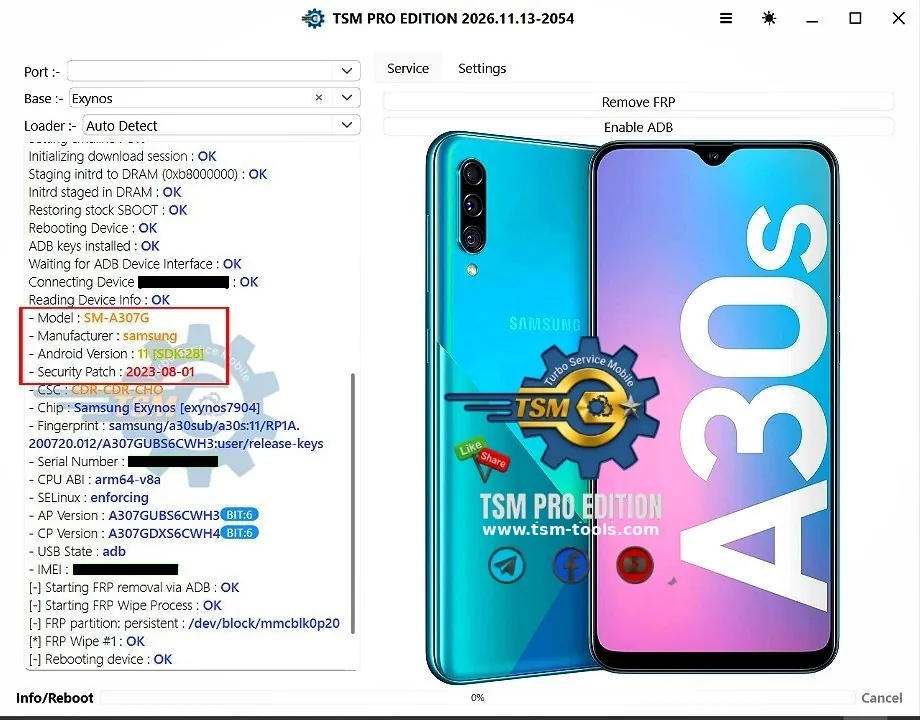
FRP lock removed — Download + ADB mode, FRP Wipe #1 OK. Full work log is in the screenshot, all steps OK.

Logs:

Log
TSM PRO EDITION 2026.11.13-2054
Base :- Exynos
Loader :- Auto Detect
Initializing download session : OK
Staging initrd to DRAM (0x80000000) : OK
Initrd staged in DRAM : OK
Restoring stock SBOOT : OK
Rebooting Device : OK
ADB keys installed : OK
Waiting for ADB Device Interface : OK
Connecting Device [hidden] : OK
Reading Device Info : OK
- Model : SM-A307G
- Manufacturer : samsung
- Android Version : 11 [SDK:28]
- Security Patch : 2023-08-01
- CSC : CDR-CDR-CHO
- Chip : Samsung Exynos [exynos7904]
- Fingerprint : samsung/a30sub/a30s:11/RP1A.
200720.012/A307GUBS6CW…
- Serial Number : [hidden]
- CPU ABI : arm64-v8a
- SELinux : enforcing
- AP Version : A307GUBS6CWH3 BIT:6
- CP Version : A307GDXS6CWH4 BIT:6
- USB State : adb
- IMEI : [hidden]
[-] Starting FRP removal via ADB : OK
[-] Starting FRP Wipe Process : OK
[-] FRP partition: persistent : /dev/block/mmcblk0p20
[*] FRP Wipe #1 : OK
[-] Rebooting device : OK

Step-by-step guide

  • Connect the phone in Download Mode — "Initializing download session : OK". The tool stages the initrd to DRAM (0x80000000), restores the stock SBOOT, then reboots the device.
  • ADB keys are installed, the tool waits for the ADB Device Interface and connects the device.
  • The tool reads the device info: Model SM-A307G, Manufacturer samsung, Android Version 11 [SDK:28], Security Patch 2023-08-01, CSC CDR-CDR-CHO, Chip Samsung Exynos [exynos7904], AP Version A307GUBS6CWH3 BIT:6, CP Version A307GDXS6CWH4 BIT:6.
  • Click Remove FRP — "Starting FRP removal via ADB : OK", "Starting FRP Wipe Process : OK", FRP partition persistent /dev/block/mmcblk0p20, "FRP Wipe #1 : OK".
  • "Rebooting device : OK" — FRP lock removed, phone reboots.

Telegram Channel

WhatsApp Channel

#RemoveFRP #GalaxyA30s #SMA307G #TSMToolPRO #FRPBypass #Exynos #DownloadMode #ADB #Samsung

Create an account or Login to comment

You need an account to view images, open links, comment or like. Create an account or log in — it only takes a moment.

0 comments • 0 shares • 72 views • 2 min read

Remove FRP Tecno POVA 7 Ultra 5G LJ9 | TSM Pro Edition

Remove FRP Tecno POVA 7 Ultra 5G LJ9

  • Remove FRP | Tecno POVA 7 ULTRA 5G
  • Model: LJ9 | Android: 16 [SDK:36]
  • Patch: 2026-10-05
  • CPU: MTK (mt6897) | Mode: Meta (META-TRN)
  • Build: lj9-16.3.0.160sp03
  • By: TSM PRO EDITION

The FRP lock got removed in 1 minute 35 seconds, Meta mode, tested on 20 Nov 2026. Factory reset went fine too, and the phone rebooted. The full work log is in the screenshot.

Telegram Channel 

WhatsApp Channel 

Logs:

Log
TSM PRO EDITION 2026.11.13-2054
Base :- Mediatek
Loader :- Brom V2
Connecting Mt IA device : OK
Chip HRID : 784B369B9BE15002355A211C70A739A300
Reading Version Info : OK
- Platform : mt6897
- Build Date : Thu Oct 15 21:23:16 CST 2026
- SW Version : alps-mp-u0.mp1.rc-
v12.119_reallytek.u0mp1rc.k6989v1.64_P21
- DispID : lj9-16.3.0.160sp03(OP004PF001AZ)
Reading Device Info : OK
- Brand : TECNO
- Model : TECNO LJ9
- Board : TECNO-LJ9
- Build ID : lj9-16.3.0.160sp03(OP004PF001AZ)
- Android Version : 16 [SDK:36]
- [one line hidden behind the red circle annotation]
- Security Patch : 2026-10-05
- Fingerprint : TECNO/LJ9-OP/TECNO-LJ9:16/BP2A.
250605.031.a3/301600018:u…
Reading GUID Partition Table : OK [90]
Removing frp lock [META-TRN] : OK
Reset to factory default (P3-TRN)[META] : OK
Rebooting device : OK
#- : TSM PRO EDITION 2026.11.13-2054
Elapsed Time : 01:35 at [2026/11/20 22:24:07]

Step-by-step guide

  • In the tool, select the Base: Mediatek and the Loader: Brom V2.
  • Connect the phone — "Connecting Mt IA device : OK", then the tool reads the version info: Platform mt6897, Build Date Thu Oct 15 21:23:16 CST 2026, SW Version alps-mp-u0.mp1.rc-v12.119_reallytek.u0mp1rc.k6989v1.64_P21, DispID lj9-16.3.0.160sp03(OP004PF001AZ).
  • The tool reads the device info: Brand TECNO, Model TECNO LJ9, Board TECNO-LJ9, Build ID lj9-16.3.0.160sp03(OP004PF001AZ), Android Version 16 [SDK:36], Security Patch 2026-10-05.
  • Select the Meta Task: Remove FRP Tecno/Infinix/Ite… (shown in the right panel, pointed to by the red arrow).
  • Click Remove FRP — "Removing frp lock [META-TRN] : OK", then "Reset to factory default (P3-TRN)[META] : OK", then "Rebooting device : OK".
  • Done in 1 minute 35 seconds — FRP lock removed, phone factory reset and rebooted.

#RemoveFRP #TecnoPOVA7Ultra #LJ9 #TSMToolPRO #FRPBypass #MTK #MetaMode #Tecno

Create an account or Login to comment

You need an account to view images, open links, comment or like. Create an account or log in — it only takes a moment.

0 comments • 0 shares • 85 views • 2 min read 2

Remove FRP LT Mobile M70 5G X9 MTK | TSM Pro Edition

Remove FRP | LT MOBILE M70 5G 

Model: X9 (LT X9) | Android: 13 [SDK:33]
Patch: 2026-04-05
CPU: MediaTek | Mode: Preloader (BROM)
Product: LT_mobile_X9

By: TSM PRO EDITION

The FRP lock got removed in 18 seconds, Preloader (MTK BROM) mode, tested on 21 Nov 2026.
Telegram Channel

WhatsApp Channel

Logs

Log
TSM PRO EDITION 2026.11.13-2054base :- M70 [X9]- Vendor : ID:Samsung | CID:KM8F9001MM-B830 | UFS_ID:0X1CEWaiting for MTK Brom usb device : OKUSB Port : MediaTek DA USB VCOM (Android) (COM67)USB Device : MediaTek Inc. oem262.inf v3.0.1512.0 1-4-2023[0xE8D-0x2001]Reading GUID Partition Table : OK [64]Reading Device Info : OK [EXT4]- Model : LT X9- Manufacturer : LT_mobile- Android Version : 13 [SDK:33]- Security Patch Level : 2026-04-05- DevProduct : pri_board- Product : LT_mobile_X9- BuildID : tp1a.220624.014- DisplayID : lt-x9lnf9.fhd.t.ptnuucmxaey8nmnvuv.0520.2330.v3.06- BuiltDate : Wed May 20 23:43:29 CST 2026- Build Version : 1779291809- Fingerprint : LT_mobile/LT_mobile_X9/LT_mobile_X9:13/tp1a.220624.014/1779291809:… Active slot : (_a) both_active[1]Removing frp lock : OKRebooting device : OK#- : TSM PRO EDITION 2026.11.13-2054elapsed Time : 00:18 at [2026/11/21 12:27:34]

Step-by-step guide

  1. In the tool, select the Base: M70 [X9].
  2. Connect the phone in Preloader mode. The tool waits for the MTK BROM USB device and detects it on MediaTek DA USB VCOM (Android) (COM67).
  3. It reads the GUID Partition Table (64 partitions) and the device info: Model LT X9, Manufacturer LT_mobile, Android Version 13 [SDK:33], Security Patch Level 2026-04-05, Product LT_mobile_X9.
  4. Click Remove FRP — "Removing frp lock : OK", then "Rebooting device : OK".
  5. Done in 18 seconds — FRP lock removed and the phone reboots.

#RemoveFRP #LTMobile #M70 #LTX9 #TSMToolPRO #FRPBypass #MediaTek #Preloader

Create an account or Login to comment

You need an account to view images, open links, comment or like. Create an account or log in — it only takes a moment.

0 comments • 0 shares • 78 views • 2 min read

Remove FRP STYLO DASH Unisoc ADL Mode | TSM Pro Edition

Remove FRP | STYLO DASH

Model: DASH | Android: 15 [SDK:35]
Patch: 2025-11-05
CPU: UNISOC SC9863A [sp9863a] | Mode: ADL
Build: 20251212 | Product: STYLO_DASH

By: TSM PRO EDITION

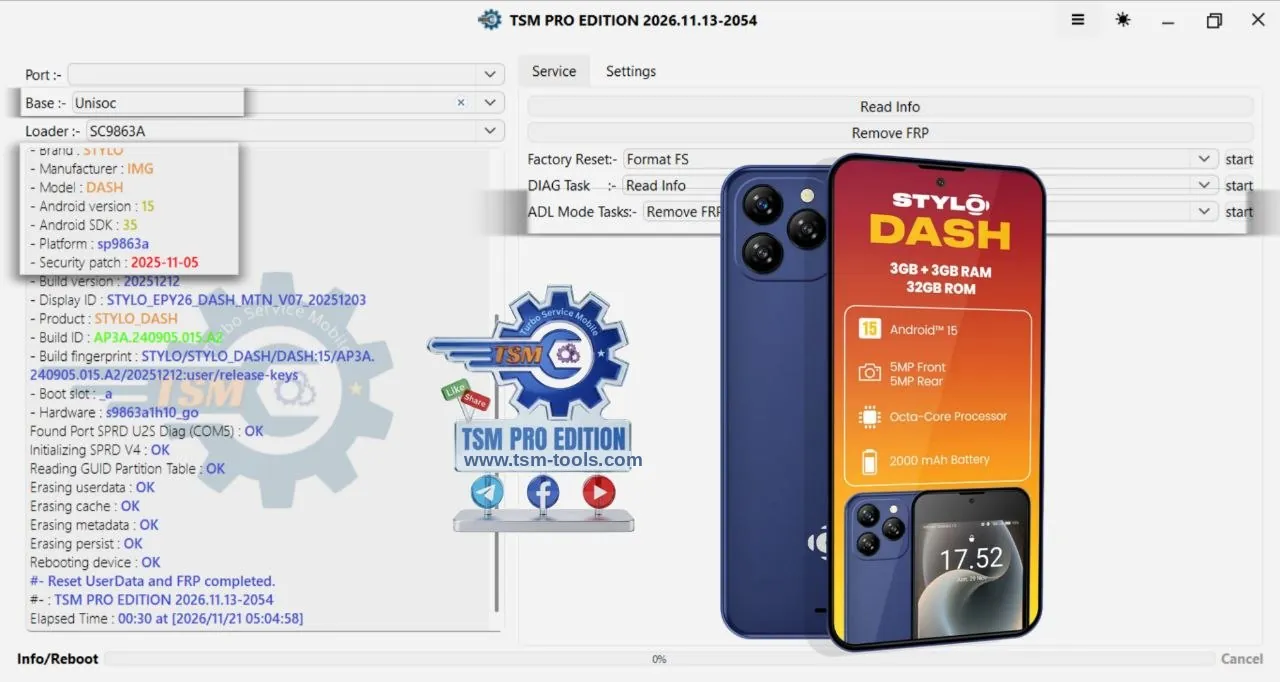
The FRP + UserData reset finished in 30 seconds, ADL mode, tested on 21 Nov 2026.
Logs:
TSM PRO EDITION 2026.11.13-2054
Base :- Unisoc
Loader :- SC9863A

  • Brand : STYLO
  • Manufacturer : IMG
  • Model : DASH
  • Android version : 15
  • Android SDK : 35
  • Platform : sp9863a
  • Security patch : 2025-11-05
  • Build version : 20251212
  • Display ID : STYLO_EPY26_DASH_MTN_V07_20251203
  • Product : STYLO_DASH
  • Build ID : ap3a.240905.015.a2
  • Build fingerprint : STYLO/STYLO_DASH/DASH:15/AP3A.

240905.015.a2/20251212:us…

  • Boot slot : _a
  • Hardware : s9863a1h10_go

Found Port SPRD U2S Diag (COM5) : OK
Initializing SPRD V4 : OK
Reading GUID Partition Table : OK
Erasing userdata : OK
Erasing cache : OK
Erasing metadata : OK
Erasing persist : OK
Rebooting device : OK
#- Reset UserData and FRP completed.
#- : TSM PRO EDITION 2026.11.13-2054
Elapsed Time : 00:30 at [2026/11/21 05:04:58]

Step-by-step guide:

In the tool, select the Base: Unisoc and the Loader: SC9863A.

Connect the phone in ADL mode. The tool finds the port — SPRD U2S Diag (COM5) — and initializes SPRD V4.

It reads the GUID Partition Table and the device info: Brand STYLO, Manufacturer IMG, Model DASH, Android version 15 [SDK:35], Platform sp9863a, Security patch 2025-11-05, Build version 20251212.

Run the ADL Mode Task — Remove FRP — the tool erases userdata, cache, metadata and persist, one by one, all OK.
The device reboots — "Reset UserData and FRP completed."

Done in 30 seconds — FRP lock removed with a full userdata reset.

tsm-tools.com
Telegram Channel: t.me/tsmtoolproe…
WhatsApp Channel: whatsapp.com/channel/002…

#RemoveFRP #STYLODASH #DASH #TSMToolPRO #FRPBypass #Unisoc #ADLMode

Create an account or Login to comment

You need an account to view images, open links, comment or like. Create an account or log in — it only takes a moment.

0 comments • 0 shares • 78 views • 2 min read

Remove FRP STYLO MESA Unisoc ADL Mode | TSM Pro Edition

Remove FRP | STYLO MESA 

Model: MESA | Android: 15 [SDK:35]
Patch: 2025-11-05
CPU: UNISOC SC9863A [sp9863a] | Mode: ADL
Build: 20251129 | Product: STYLO_MESA

By: TSM PRO EDITION

The FRP + UserData reset finished in 50 seconds, ADL mode, tested on 9 Nov 2026.
Logs:

TSM PRO EDITION 2026.11.09-0047
Base :- Unisoc
Loader :- SC7731E

  • Manufacturer : IMO
  • Model : MESA
  • Android version : 15
  • Android SDK : 35
  • Platform : sp9863a
  • Security patch : 2025-11-05
  • Build version : 20251129
  • Display ID : STYLO_EPY29_MESA_V05_20251107
  • Product : STYLO_MESA
  • Build ID : ap3a.240905.015.a2
  • Wi-Fi MAC : [hidden]
  • Build fingerprint : STYLO/STYLO_MESA/MESA:15/AP3A.

240905.015.a2/20251129:us…

  • Boot slot : _a
  • Hardware : s9863a1h10_go

Found Port SPRD U2S Diag (COM6) : OK
Initializing SPRD V4 : OK
Reading GUID Partition Table : OK
Erasing userdata : OK
Erasing cache : OK
Erasing metadata : OK
Erasing persist : OK
Rebooting device : OK
#- Reset UserData and FRP completed.
#- : TSM PRO EDITION 2026.11.09-0047
Elapsed Time : 00:50 at [2026/11/09 14:12:18]

Step-by-step guide:

In the tool, select the Base: Unisoc and the Loader: SC7731E.

Connect the phone in ADL mode. The tool finds the port — SPRD U2S Diag (COM6) — and initializes SPRD V4.

It reads the GUID Partition Table and the device info: Model MESA, Manufacturer IMO, Android version 15 [SDK:35], Platform sp9863a, Security patch 2025-11-05, Build version 20251129.

Run the task — the tool erases userdata, cache, metadata and persist, one by one, all OK.

The device reboots — "Reset UserData and FRP completed."

Done in 50 seconds — FRP lock removed with a full userdata reset.

tsm-tools.com
Telegram Channel: t.me/tsmtoolproe…
WhatsApp Channel: whatsapp.com/channel/002…

#RemoveFRP #STYLOMESA #MESA #TSMToolPRO #FRPBypass #Unisoc #ADLMode

Create an account or Login to comment

You need an account to view images, open links, comment or like. Create an account or log in — it only takes a moment.

0 comments • 0 shares • 64 views • 2 min read

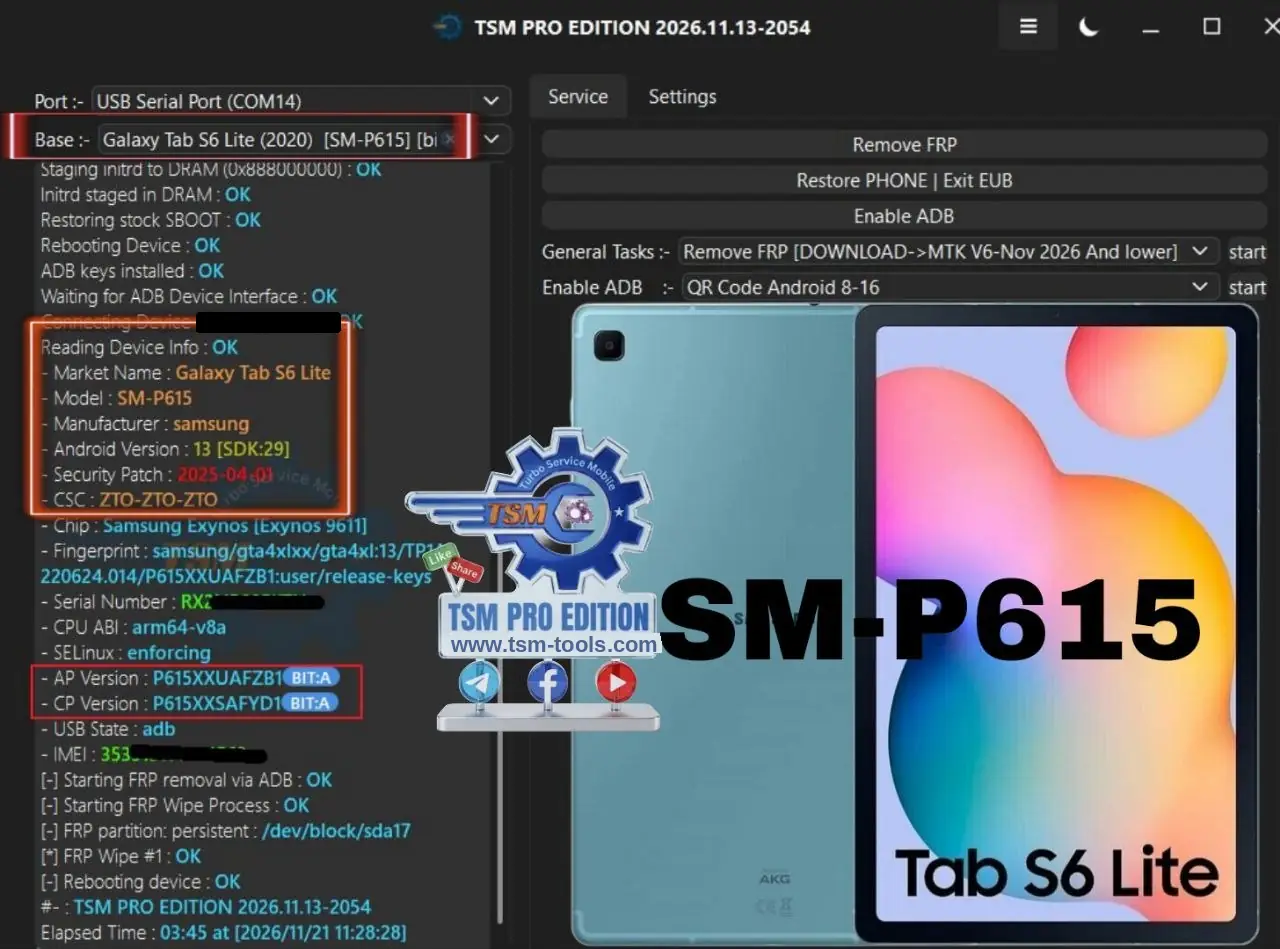
Remove FRP Galaxy Tab S6 Lite P615 Bit A | TSM Pro Edition

Remove FRP | GALAXY TAB S6 LITE

Model: SM-P615 | Android: 13 [SDK:29]
Bit: A | Patch: 2025-04-01
CPU: Samsung Exynos 9611 | Mode: Download + ADB
AP: P615XXUAFZB1 | CP: P615XXSAFYD1

By: TSM PRO EDITION

The FRP lock got removed in 3 minutes 45 seconds, Download + ADB mode, tested on 21 Nov 2026.
Logs :

TSM PRO EDITION 2026.11.13-2054
Port :- USB Serial Port (COM14)
Base :- Galaxy Tab S6 Lite (2020) [SM-P615] [bit...]
Staging initrd to DRAM (0x88800000) : OK
Initrd staged in DRAM : OK
Restoring stock SBOOT : OK
Rebooting Device : OK
ADB keys installed : OK
Waiting for ADB Device Interface : OK
Connecting Device [hidden] : OK
Reading Device Info : OK

Market Name : Galaxy Tab S6 Lite
Model : SM-P615
Manufacturer : samsung
Android Version : 13 [SDK:29]
Security Patch : 2025-04-01
CSC : ZTO-ZTO-ZTO
Chip : Samsung Exynos [Exynos 9611]
Fingerprint : samsung/gta4xlxx/gta4xl:13/TP1A.

220624.014/P615XXUAFZB…

Serial Number : [hidden]
CPU ABI : arm64-v8a
SELinux : enforcing
AP Version : P615XXUAFZB1 BIT:A
CP Version : P615XXSAFYD1 BIT:A
USB State : adb
IMEI : [hidden]

[-] Starting FRP removal via ADB : OK
[-] Starting FRP Wipe Process : OK
[-] FRP partition: persistent : /dev/block/sda17
[*] FRP Wipe #1 : OK
[-] Rebooting device : OK
#- : TSM PRO EDITION 2026.11.13-2054
Elapsed Time : 03:45 at [2026/11/21 11:28:28]

Setup By setup Guide:

Select the Base: Galaxy Tab S6 Lite (2020) [SM-P615] and connect the tablet on USB Serial Port (COM14).

The tool stages the initrd to DRAM (0x88800000), restores the stock SBOOT, then reboots the device.

ADB keys are installed, the tool waits for the ADB Device Interface, then connects the device and reads the device info: Market Name Galaxy Tab S6 Lite, Model SM-P615, Android 13 [SDK:29], Security Patch 2025-04-01, CSC ZTO-ZTO-ZTO.

Chip: Samsung Exynos [Exynos 9611]; AP Version P615XXUAFZB1 BIT:A; CP Version P615XXSAFYD1 BIT:A.

FRP removal starts via ADB — the tool wipes the FRP partition (persistent : /dev/block/sda17), "FRP Wipe #1 : OK", then reboots the device.

Done in 3 minutes 45 seconds — FRP lock removed.

tsm-tools.com
Telegram Channel: t.me/tsmtoolproe…
WhatsApp Channel: whatsapp.com/channel/002…

#RemoveFRP #GalaxyTabS6Lite #SMP615 #TSMToolPRO #FRPBypass #Exynos #Samsung

Create an account or Login to comment

You need an account to view images, open links, comment or like. Create an account or log in — it only takes a moment.

0 comments • 0 shares • 75 views • 2 min read 1

Remove FRP Nothing Phone 4B A009P EDL | TSM Pro Edition

Remove FRP | Nothing Phone 4B

Model: A009P | Android: 16 [SDK:36]
Patch: 2026-05-01
CPU: Qualcomm Snapdragon 6 Gen 4 [SM6450] | Mode: EDL
OS: Nothing OS (4) | Device: SuperContra

By: TSM PRO EDITION

The FRP lock got removed in 11 seconds, EDL (Firehose) mode, tested on 21 Nov 2026.

Logs:

TSM PRO EDITION 2026.11.13-2054
Base :- Qualcomm
01cf

  • OEM PKHASH :

0283f72a283a5091579f799b86eac4332c7e55412ab
5888e5a8d8e917f900013

  • HW_ID : 002b70e101cfa018
  • CHIP : Qualcomm Snapdragon 6 Gen 4 [SM6450]

Sending Firehose Programmer [P1:1743776] : OK
Configuring Firehose : OK Memrory:UFS | Lun Count:
6 | Block Size:0x1000
Memory : OEM ID 429 | Product HN8T066EHKX155
Reading GUID Partition Table : OK [126]
Reading Device Info : OK [EROFS]

  • Model : A009P
  • DEVICE : SuperContra
  • Manufacturer : Nothing
  • Android Version : 16 [SDK:36]
  • Security Patch Level : 2026-05-01
  • DevProduct : volcano
  • BuildID : bq2a.260210.001-bp2a.250705.008
  • DisplayID : b4.1-260522-2231
  • BuiltDate : Fri May 22 22:31:17 CST 2026
  • Build Version : 2605222231
  • OS Version : Nothing OS (4)
  • Fingerprint : Nothing/SuperContra/SuperContra:

14/ukq1.260129.001/2605222231:…
Removing frp lock : OK
Rebooting device : OK
#- : TSM PRO EDITION 2026.11.13-2054
Elapsed Time : 00:11 at [2026/11/21 19:53:34]

Step-by-step guide:

In the tool, select the Base: Qualcomm.

Connect the phone in EDL mode. The tool detects the chip: Qualcomm Snapdragon 6 Gen 4 [SM6450], HW_ID 002b70e101cfa018.

The tool sends the Firehose Programmer [P1:1743776] and configures Firehose — Memory UFS, Lun Count 6, Block Size 0x1000.

It reads the GUID Partition Table (126 partitions) and the device info: Model A009P, DEVICE SuperContra, Manufacturer Nothing, Android Version 16 [SDK:36], Security Patch Level 2026-05-01.

Click Remove FRP — "Removing frp lock : OK", then "Rebooting device : OK".

Done in 11 seconds — FRP lock removed and the phone reboots.

tsm-tools.com
Telegram Channel: t.me/tsmtoolproe…
WhatsApp Channel: whatsapp.com/channel/002…

#RemoveFRP #NothingPhone4B #A009P #TSMToolPRO #NothingPhone #FRPBypass #Qualcomm #EDL

Create an account or Login to comment

You need an account to view images, open links, comment or like. Create an account or log in — it only takes a moment.