




Administrator cover photo
Administrator

Administrator

AdministratorVerified Purchase

3 followers • 0 following • 4 friends

GSM Technician • Texas

https://gsmprohub.com

GSM PRO HUB

Texas, United States • 9 years of experience • GSM Pro Hub • ✓ Location certified

Personal details

  • GSM Technician at GSM Pro Hub
  • MA
  • Specializes in Mobile Repair And Unlocking
  • Assurant Editorial
  • Lives in Texas, United States
  • 9 yrs exp

Friends

4 friends

Administrator photoAdministrator photoAdministrator photoAdministrator photoAdministrator photo

Groups

1 group joined

0 comments • 0 shares • 187 views • 1 min read 3

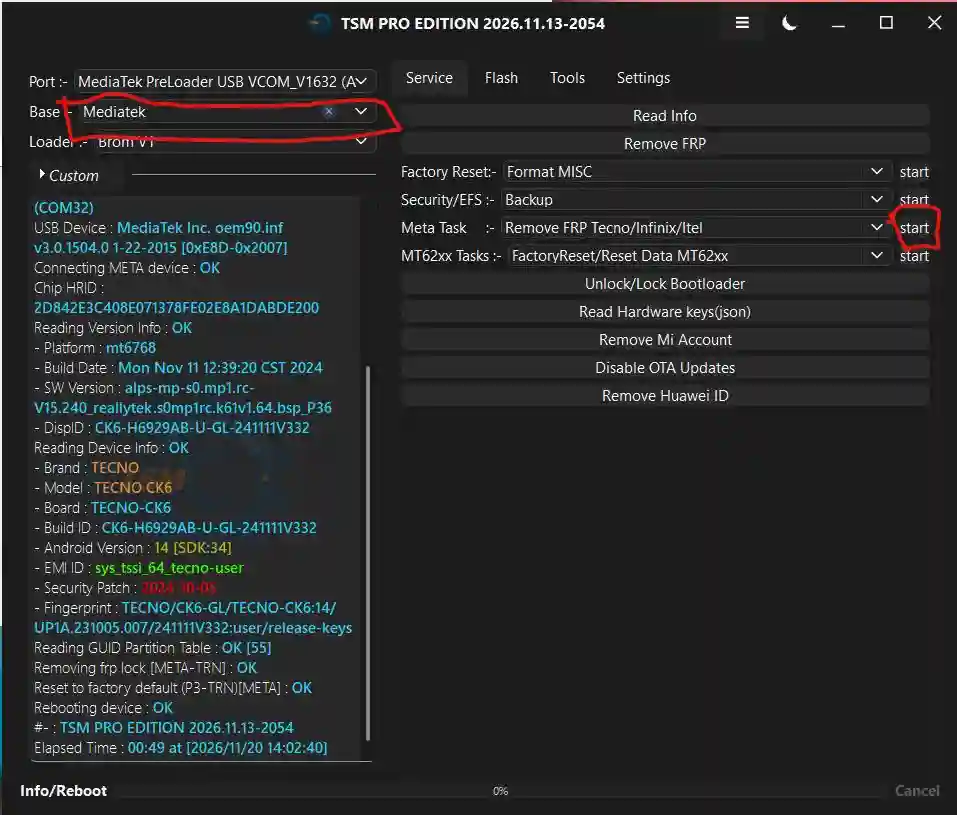
TECNO CAMON 20 FRP Removed Successfully via TSM PRO EDITION

Successfully completed FRP removal on TECNO Camon 20 using TSM PRO EDITION. The device was connected via MediaTek Preloader USB VCOM and processed through META mode.

Device Details:

- **Brand:** TECNO

- **Model:** TECNO Camon 20

- **Platform:** MediaTek

- **Android Version:** Android 14

- **Security Patch:** 2024-10-05

- **Tool:** TSM PRO EDITION

- **Operation:** Remove FRP

- **Mode:** META Mode

FRP Removal Process :

The device was detected successfully by TSM PRO EDITION through the MediaTek PreLoader connection. After connecting the device in META mode, the FRP removal task was started.

The tool log confirms the following operations:

- Connecting META device: OK
- Reading device information: OK
- Reading GUID partition table: OK
- Removing FRP lock: OK
- Resetting to factory default: OK
- Rebooting device: OK

The device was detected successfully by TSM PRO EDITION through the MediaTek PreLoader connection. After connecting the device in META mode, the FRP removal task was started.

FRP operation completed successfully!

This post is based on the shown tool log and is intended for authorized mobile servicing.

#TECNO #Camon20 #TECNOFRP #FRPRemoval #TSMPro #TSMTool #MediaTek #Android14 #MobileRepair #GSMTools #TSMtoolpro

Create an account or Login to comment

You need an account to view images, open links, comment or like. Create an account or log in — it only takes a moment.

0 comments • 1 shares • 166 views • 2 min read 6

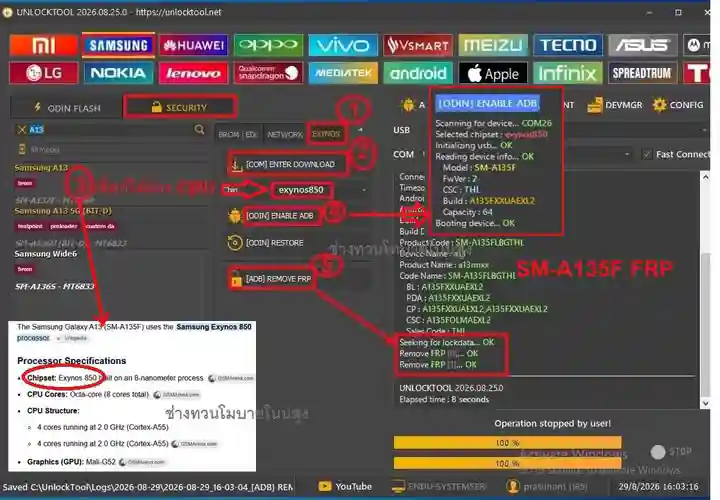
Samsung SM-A135F FRP Android 14 Removal via UnlockTool – Exynos 850 Guide

The Samsung Galaxy A13 (SM-A135F) powered by the Exynos 850 chipset may require FRP (Factory Reset Protection) account verification after a factory reset. This guide covers device identification, chipset information, and the UnlockTool interface shown in the tutorial image.

## Device Information

- **Device Model:** Samsung Galaxy A13 (SM-A135F)

- **Chipset:** Exynos 850

- **CPU:** Octa-Core

- **Android Version:** Android 14

- **Security Feature:** Factory Reset Protection (FRP)

- **Tool:** UnlockTool

- **Device Platform:** Samsung Exynos

## UnlockTool Interface Overview

In the provided UnlockTool screenshot, the Samsung A13 SM-A135F is selected under the Samsung device section. The interface displays the Exynos chipset selection and related device-service options.

The screenshot also shows device communication status and FRP-related operation logs. Tool compatibility, device firmware, and security updates may affect the available service functions.

## Important Notes

- Confirm the exact Samsung model before performing any device servicing.
- Use authorized servicing procedures and tools.
- FRP is designed to protect devices against unauthorized access after a factory reset.
- If the device belongs to you, use the previously synchronized Google account or Google's official account recovery process.

## Conclusion

The Samsung Galaxy A13 SM-A135F is based on the Exynos 850 platform. Identifying the correct model and chipset is an important part of Samsung device servicing and troubleshooting.

This guide is intended for educational purposes and authorized device servicing.

**Device:** Samsung Galaxy A13 SM-A135F  
**Platform:** Exynos 850  
**Tool Reference:** UnlockTool

#SamsungA135F #SM_A135F #SamsungA13 #FRPRemoval #FRPBypass #Android14 #UnlockTool #Exynos850 #SamsungFRP #MobileRepair #GSMTools #SamsungUnlock #TechTutorial #MobileTechnician #FRPGuide

Create an account or Login to comment

You need an account to view images, open links, comment or like. Create an account or log in — it only takes a moment.

0 comments • 0 shares • 162 views • 1 min read 3

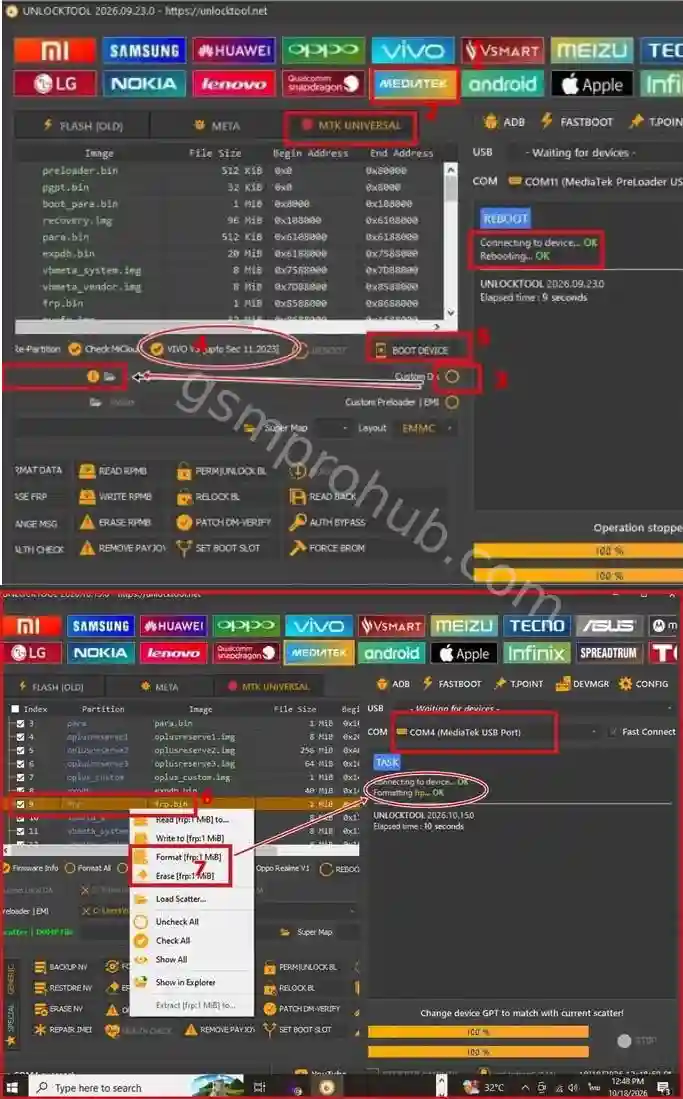
MTK UNIVERSAL FRP – Important Precautions for MTK CPU Technicians

MTK UNIVERSAL FRP – Important Precautions for MTK CPU Technicians

Working with MTK devices requires extra care, especially when dealing with FRP-related partitions.

The screenshots show the MTK Universal section in UnlockTool and the FRP partition options.

Important Technician Tips:

Always identify the correct device model and chipset before starting.

Carefully check the selected COM port and device connection.

Make sure you have the correct firmware and a suitable backup.

Be careful when modifying or erasing FRP-related partitions.

Selecting the wrong partition or using an incompatible procedure can cause boot failure or serious software problems.

Keep a compatible firmware and backup available before servicing.
Why Is This Important?

MTK devices can have different partition layouts and security configurations. An incorrect operation may cause the device to crash or fail to boot. Recovery can be difficult, particularly if a valid dump or backup is unavailable.

Important: Only perform servicing on devices you own or are authorized to repair. Use official account recovery for devices whose ownership cannot be verified.

Tool: UnlockTool

Module: MTK Universal

Platform: MediaTek (MTK)

#UnlockTool #MTKUniversal #MTKFRP #MediaTek #FRPRepair #MobileSoftware #GSMTechnician #MobileRepair

Create an account or Login to comment

You need an account to view images, open links, comment or like. Create an account or log in — it only takes a moment.

0 comments • 1 shares • 169 views • 1 min read 4

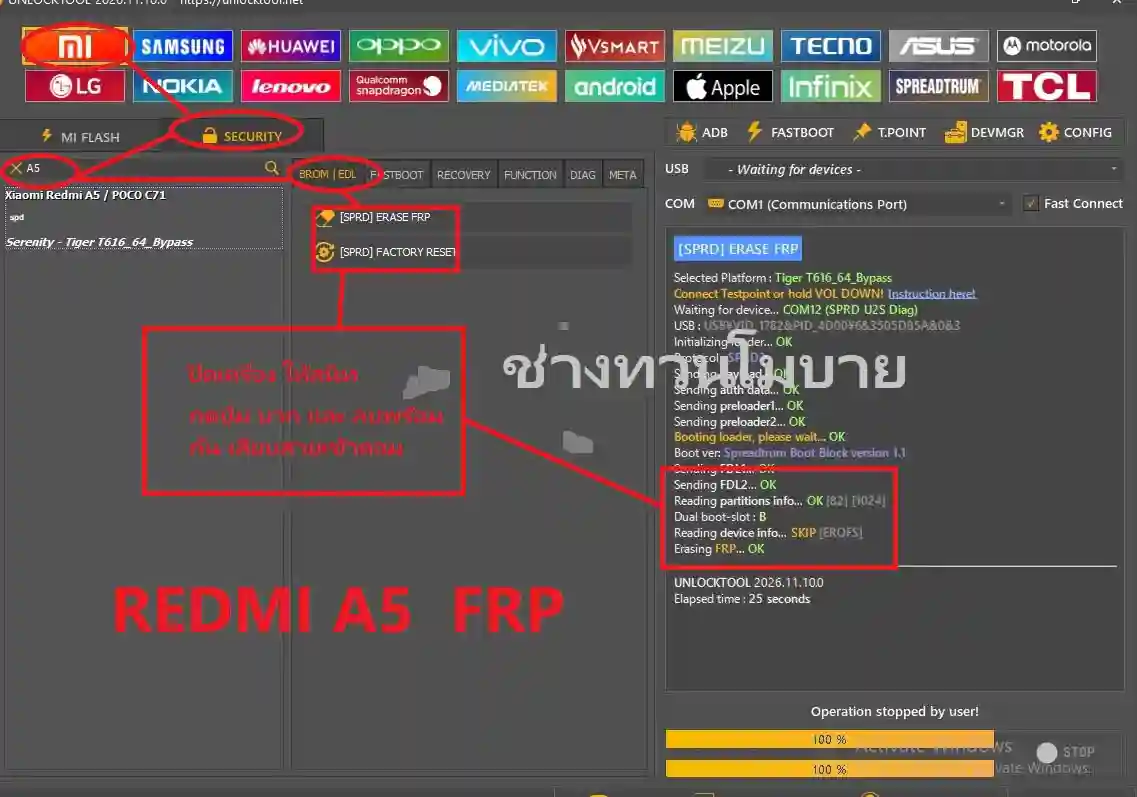
REDMI A5 FRP REMOVE – SPD CPU

REDMI A5 FRP REMOVAL – SPD CPU

Completed FRP removal on Redmi A5 using UnlockTool.

Steps shown:

Open UnlockTool → Security.

Search for Redmi A5.

Select BROM | EDL.

Choose [SPRD] ERASE FRP.

Connect the device in the required mode.

FRP ERASED – OK

Device: Redmi A5 CPU: SPD (Spreadtrum) Tool: UnlockTool 2026

#RedmiA5 #FRPRemove #SPD #UnlockTool #MobileRepair #GSMTechnician

@all

Create an account or Login to comment

You need an account to view images, open links, comment or like. Create an account or log in — it only takes a moment.

0 comments • 1 shares • 79 views • 1 min read 4

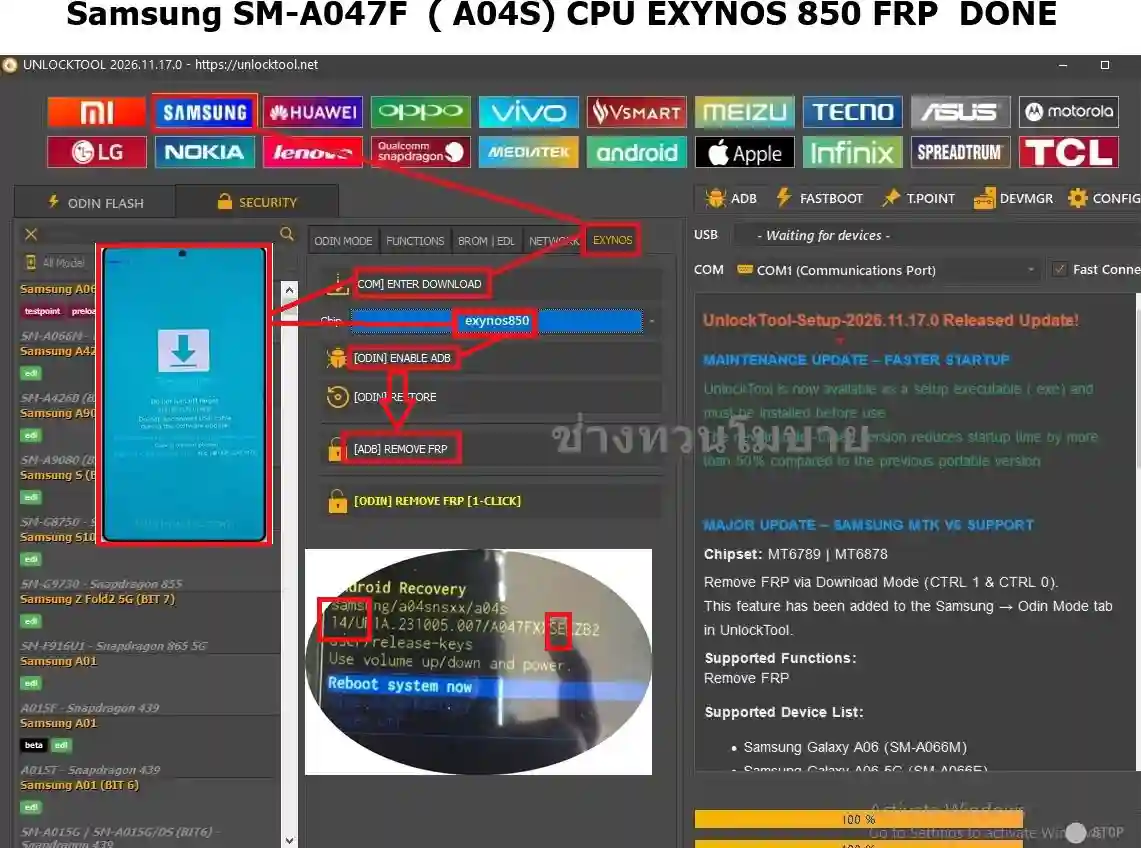
Samsung SM-A047F (A04S) CPU EXYNOS 850 V14 FRP DONE OK

Samsung SM-A047F (A04S) CPU EXYNOS 850 V14 FRP DONE OK

Unlock Tool Guide:

1- Go Samsung Tab 
2- Click Exynos Section 
3- Enter Device Download Mode [ first connect usb cable ]
4- Select Exynos850 Chips 
5-  Click Odin Enable ADB 
5- Click [ Adb FRP ] 

Job Done - Erase FRP Lock Samsung A047F with Unlock Tool In Download Mode . 

#unlocktool

@all

Create an account or Login to comment

You need an account to view images, open links, comment or like. Create an account or log in — it only takes a moment.