



FRP BYpass cover photo
FRP BYpass

FRP BYpassVerified Professional

Verified GSM Expert Hardware Expert

0 followers • 1 following • 1 friends

Mobile Software Technician • Juneau

Juneau, United States • 7 years of experience • ✓ Location likely

Personal details

  • Mobile Software Technician
  • Lives in Juneau, United States
  • 7 yrs exp

Friends

1 friend

FRP BYpass photoFRP BYpass photoFRP BYpass photo

Groups

1 group joined

0 comments • 0 shares • 137 views • 1 min read 4
ASK Help fa-question-circle General Help

Let's Talk Mobile Repair & Android Security! About Anti-Crack & P7 ?

Problem

I have a few questions for mobile technicians and Android experts:

🔹 What is Anti-Crack in mobile phones, and what is its purpose?

🔹 How can Anti-Theft protection be removed from an Android phone legally?

🔹 What does "Anti-Crack" actually mean in mobile servicing?

🔹 How do you remove or disable antivirus software when it's causing issues?

💬 Share your knowledge and experience in the comments! Let's help each other learn new mobile repair techniques and troubleshooting solutions.

#MobileRepair #AndroidTips #GSMTechnician #AndroidSecurity #MobileServicing #TechDiscussion #AntiCrack #Anti-Crack

Create an account or Login to comment

You need an account to view images, open links, comment or like. Create an account or log in — it only takes a moment.

0 comments • 0 shares • 169 views • 1 min read 3
Originally posted by Administrator • View original post
Administrator
1 day ago

The Samsung Galaxy A13 (SM-A135F) powered by the Exynos 850 chipset may require FRP (Factory Reset Protection) account verification after a factory reset. This guide covers device identification, chipset information, and the UnlockTool interface shown in the tutorial image.

Device Information

  • **Device Model:** Samsung Galaxy A13 (SM-A135F)
  • **Chipset:** Exynos 850
  • **CPU:** Octa-Core
  • **Android Version:** Android 14
  • **Security Feature:** Factory Reset Protection (FRP)
  • **Tool:** UnlockTool
  • **Device Platform:** Samsung Exynos

UnlockTool Interface Overview

In the provided UnlockTool screenshot, the Samsung A13 SM-A135F is selected under the Samsung device section. The interface displays the Exynos chipset selection and related device-service options.

The screenshot also shows device communication status and FRP-related operation logs. Tool compatibility, device firmware, and security updates may affect the available service functions.

Important Notes

  • Confirm the exact Samsung model before performing any device servicing.
  • Use authorized servicing procedures and tools.
  • FRP is designed to protect devices against unauthorized access after a factory reset.
  • If the device belongs to you, use the previously synchronized Google account or Google's official account recovery process.

Conclusion

The Samsung Galaxy A13 SM-A135F is based on the Exynos 850 platform. Identifying the correct model and chipset is an important part of Samsung device servicing and troubleshooting.

This guide is intended for educational purposes and authorized device servicing.

**Device:** Samsung Galaxy A13 SM-A135F  
**Platform:** Exynos 850  
**Tool Reference:** UnlockTool

#SamsungA135F #SM_A135F #SamsungA13 #FRPRemoval #FRPBypass #Android14 #UnlockTool #Exynos850 #SamsungFRP #MobileRepair #GSMTools #SamsungUnlock #TechTutorial #MobileTechnician #FRPGuide

Create an account or Login to comment

You need an account to view images, open links, comment or like. Create an account or log in — it only takes a moment.

0 comments • 0 shares • 165 views • 1 min read 2
Originally posted by Administrator • View original post
Administrator
1 day ago

Samsung SM-A047F (A04S) CPU EXYNOS 850 V14 FRP DONE OK

Unlock Tool Guide:

1- Go Samsung Tab 
2- Click Exynos Section 
3- Enter Device Download Mode [ first connect usb cable ]
4- Select Exynos850 Chips 
5-  Click Odin Enable ADB 
5- Click [ Adb FRP ] 

Job Done - Erase FRP Lock Samsung A047F with Unlock Tool In Download Mode . 

#unlocktool

@all

Create an account or Login to comment

You need an account to view images, open links, comment or like. Create an account or log in — it only takes a moment.

0 comments • 0 shares • 162 views • 1 min read 3
Originally posted by Administrator • View original post
Administrator
1 day ago

REDMI A5 FRP REMOVAL – SPD CPU

Completed FRP removal on Redmi A5 using UnlockTool.

Steps shown:

Open UnlockTool → Security.

Search for Redmi A5.

Select BROM | EDL.

Choose [SPRD] ERASE FRP.

Connect the device in the required mode.

FRP ERASED – OK

Device: Redmi A5 CPU: SPD (Spreadtrum) Tool: UnlockTool 2026

#RedmiA5 #FRPRemove #SPD #UnlockTool #MobileRepair #GSMTechnician

@all

Create an account or Login to comment

You need an account to view images, open links, comment or like. Create an account or log in — it only takes a moment.

0 comments • 0 shares • 153 views • 1 min read 2
Originally posted by FRP BYpass • View original post
FRP BYpass
1 day ago

SAMSUNG FRP REMOVAL – UNLOCKTOOL 2026

Today, I'm sharing some information about Samsung FRP (Factory Reset Protection) and the options shown in the latest UnlockTool interface.

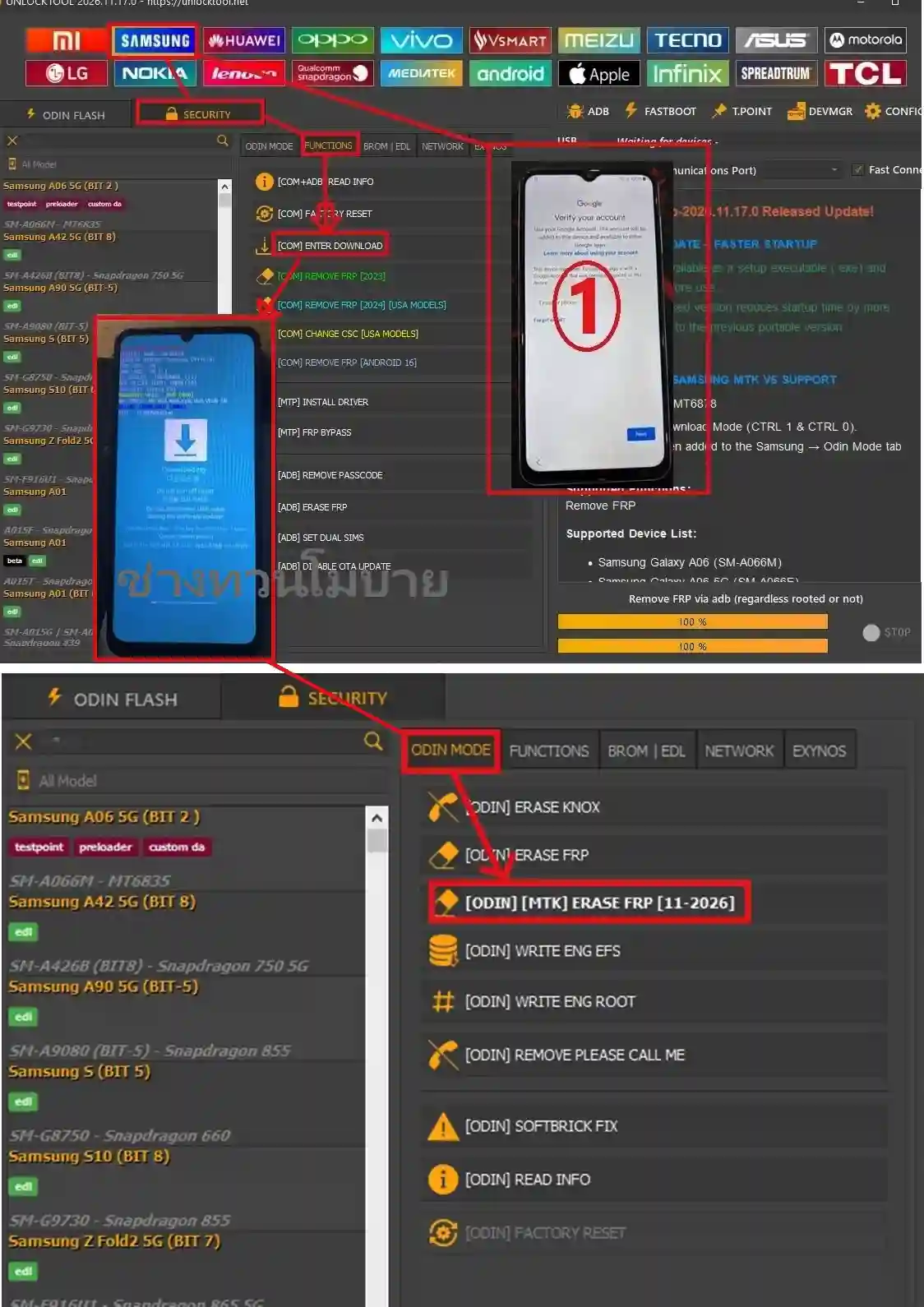
The screenshot shows two different sections for Samsung devices:

  1. SECURITY – FUNCTIONS

Open UnlockTool.
Select the Security section.
Choose the Functions tab.
The interface displays options such as Read Info, Factory Reset and FRP-related functions.
The screenshot also shows a Samsung device on the Google account verification screen and another device in Download Mode.

  1. SECURITY – ODIN MODE

Select the Odin Mode tab.
The interface includes several Samsung servicing options.
One of the highlighted options is [ODIN] [MTK] ERASE FRP [11-2026].
This option is listed for supported MediaTek-based Samsung models.

IMPORTANT NOTES

Always check the exact Samsung model and chipset before servicing.
Make sure the device belongs to the customer or that proper ownership authorization is available.
Use the correct, officially supported service procedure.
Never interrupt a firmware or servicing operation while it is running.
Availability of features depends on device model, chipset and software version.

A NOTE FOR MOBILE TECHNICIANS

Samsung devices come with different chipsets and security versions. A method that applies to one model may not work on another. Always verify device compatibility before attempting any repair.

Tool: UnlockTool
Brand: Samsung
Service: FRP / Device Servicing
Interface: Security – Functions & Odin Mode

#UnlockTool #SamsungFRP #SamsungRepair #MobileSoftware #MobileTechnician #GSMTools #SamsungService #MobileRepair

@all

Create an account or Login to comment

You need an account to view images, open links, comment or like. Create an account or log in — it only takes a moment.

0 comments • 0 shares • 110 views • 1 min read 3
Originally posted by FRP BYpass • View original post
FRP BYpass
1 day ago

SAMSUNG FRP REMOVAL – UNLOCKTOOL 2026

Today, I'm sharing some information about Samsung FRP (Factory Reset Protection) and the options shown in the latest UnlockTool interface.

The screenshot shows two different sections for Samsung devices:

  1. SECURITY – FUNCTIONS

Open UnlockTool.
Select the Security section.
Choose the Functions tab.
The interface displays options such as Read Info, Factory Reset and FRP-related functions.
The screenshot also shows a Samsung device on the Google account verification screen and another device in Download Mode.

  1. SECURITY – ODIN MODE

Select the Odin Mode tab.
The interface includes several Samsung servicing options.
One of the highlighted options is [ODIN] [MTK] ERASE FRP [11-2026].
This option is listed for supported MediaTek-based Samsung models.

IMPORTANT NOTES

Always check the exact Samsung model and chipset before servicing.
Make sure the device belongs to the customer or that proper ownership authorization is available.
Use the correct, officially supported service procedure.
Never interrupt a firmware or servicing operation while it is running.
Availability of features depends on device model, chipset and software version.

A NOTE FOR MOBILE TECHNICIANS

Samsung devices come with different chipsets and security versions. A method that applies to one model may not work on another. Always verify device compatibility before attempting any repair.

Tool: UnlockTool
Brand: Samsung
Service: FRP / Device Servicing
Interface: Security – Functions & Odin Mode

#UnlockTool #SamsungFRP #SamsungRepair #MobileSoftware #MobileTechnician #GSMTools #SamsungService #MobileRepair

@all

Create an account or Login to comment

You need an account to view images, open links, comment or like. Create an account or log in — it only takes a moment.

0 comments • 2 shares • 71 views • 2 min read 4

Samsung MTK CPU FRP Removal with Unlock Tool - All Latest Versions

SAMSUNG FRP REMOVAL – UNLOCKTOOL 2026

Today, I'm sharing some information about Samsung FRP (Factory Reset Protection) and the options shown in the latest UnlockTool interface.

The screenshot shows two different sections for Samsung devices:

  1. SECURITY – FUNCTIONS

Open UnlockTool.
Select the Security section.
Choose the Functions tab.
The interface displays options such as Read Info, Factory Reset and FRP-related functions.
The screenshot also shows a Samsung device on the Google account verification screen and another device in Download Mode.

  1. SECURITY – ODIN MODE

Select the Odin Mode tab.
The interface includes several Samsung servicing options.
One of the highlighted options is [ODIN] [MTK] ERASE FRP [11-2026].
This option is listed for supported MediaTek-based Samsung models.

IMPORTANT NOTES

Always check the exact Samsung model and chipset before servicing.
Make sure the device belongs to the customer or that proper ownership authorization is available.
Use the correct, officially supported service procedure.
Never interrupt a firmware or servicing operation while it is running.
Availability of features depends on device model, chipset and software version.

A NOTE FOR MOBILE TECHNICIANS

Samsung devices come with different chipsets and security versions. A method that applies to one model may not work on another. Always verify device compatibility before attempting any repair.

Tool: UnlockTool
Brand: Samsung
Service: FRP / Device Servicing
Interface: Security – Functions & Odin Mode

#UnlockTool #SamsungFRP #SamsungRepair #MobileSoftware #MobileTechnician #GSMTools #SamsungService #MobileRepair

@all

Create an account or Login to comment

You need an account to view images, open links, comment or like. Create an account or log in — it only takes a moment.

0 comments • 0 shares • 44 views • 1 min read 3

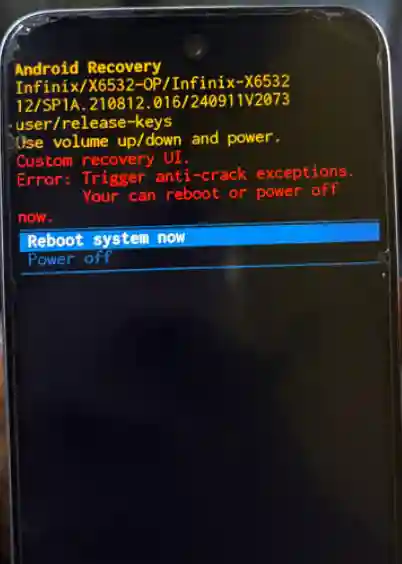
Offering service: Infinix Smart 9 X6532 OP Region

Offering service: Infinix Smart 9 X6532 OP Region Auto Bootloader Unlock, RPMB Fix, Anti-Crack Fix & Plugin Removal — $10 USDT. gsmprohub.com/services/fi…

Create an account or Login to comment

You need an account to view images, open links, comment or like. Create an account or log in — it only takes a moment.

0 comments • 0 shares • 45 views • 1 min read 1

Join My Group

Join My Group 

gsmprohub.com/groups/gsm-…

Create an account or Login to comment

You need an account to view images, open links, comment or like. Create an account or log in — it only takes a moment.

0 comments • 0 shares • 47 views • 1 min read 2

Nothing CMF Phone 1 Unbrick Firmware & FRP

Nothing CMF Phone 1 Unbrick Firmware & FRP Reset File

Originally posted in GSM Unlock Experts USA • View original post

Nothing CMF Phone 1 Unbrick Firmware & FRP Reset File

The CMF Phone 1 FRP Reset File is the full stock firmware for the Nothing CMF Phone 1 (model A015), meant for removing the FRP lock and bringing a bricked phone back to life, it runs Nothing OS 4.0 (Android 16), comes in at 5.36 GB, and gets flashed through Nothing Flash Tool in Preloader mode. There isn’t some smaller, separate FRP-only file for this model, FRP gets cleared through the full firmware flash itself. Below you’ll find the complete file details, the flashing method, the no-PC approach, and some important notes worth keeping in mind. For one-tap FRP methods, also check out the FRP Bypass hub
. Related file post: SM-T295 U4 FRP Lock Remove File, a method for removing FRP through a Samsung tablet’s firmware file.

Download Free 

bypass-frp.com/cmf-phone-1…

Create an account or Login to comment

You need an account to view images, open links, comment or like. Create an account or log in — it only takes a moment.